Fewer Apps, More Value: Integrated ERP Beats Sprawl for SMBs
Reduce costs, minimize risks, and accelerate decision-making by consolidating disconnected tools into a unified ERP ecosystem. Discover how to calculate ROI, build a practical 90-day implementation roadmap, and choose the right technology stack patterns for long-term success.
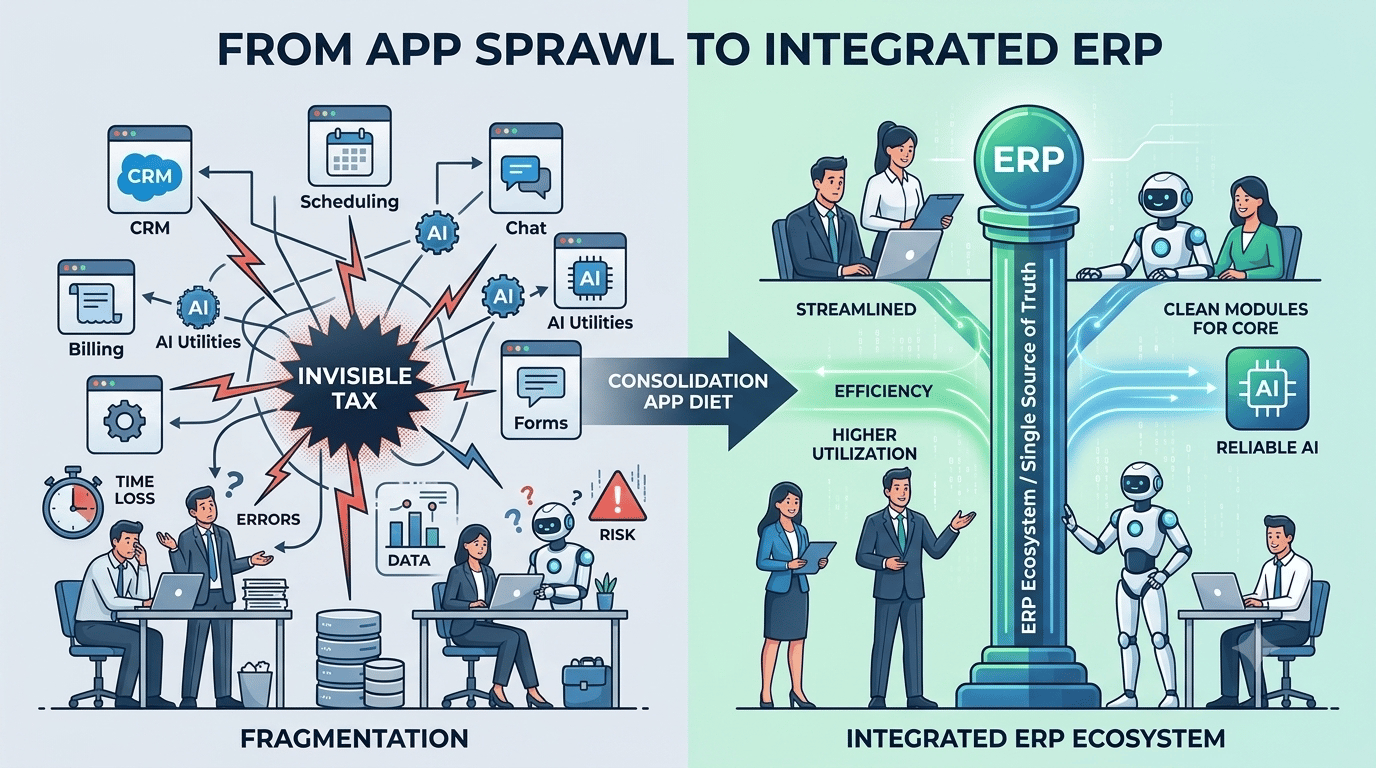
You don’t need another app. You need fewer.
When your team jumps between billing platforms, CRMs, scheduling tools, chat apps, forms, and multiple AI utilities just to support a single customer, your technology stack creates an invisible cost—lost time, increased errors, and greater operational risk. By consolidating these disconnected tools into an integrated ERP ecosystem instead of continuously adding more point solutions, businesses can reduce complexity and empower every employee—human or AI—to work more efficiently.
The Hidden Tax of App Sprawl
Most teams experience the effects of app sprawl long before they can accurately measure its impact. Individual software licenses may appear inexpensive, but the true cost of fragmentation often appears elsewhere: missed handoffs, manual data exports, broken integrations, duplicate customer records, and endless security reviews.
Consider a few signals from recent industry data:
- According to Okta’s 2025 Businesses at Work analysis, the average organization used 101 applications globally in 2024, while U.S. companies averaged 114 apps—marking the first time usage exceeded three digits. (okta.com)
- Zylo’s SaaS management research found that companies add approximately nine new unique applications each month, contributing to continuous software growth unless organizations actively remove redundant tools. (zylo.com)
- BetterCloud’s State of SaaS 2025 report highlights ongoing concerns around shadow IT, with many IT teams focused on identifying unauthorized applications, reducing redundant tools, and improving SaaS governance.(pages.bettercloud.com)
- For small and midsize businesses, JumpCloud’s Q1 2025 SME survey found that many IT administrators struggle with unauthorized applications, limited SaaS visibility, and employees using tools outside approved systems. (jumpcloud.com)
Why It Matters: Fragmentation Creates Costs Your P&L Doesn’t Label as “Software”
The true cost of app fragmentation extends far beyond software subscriptions. Many expenses are hidden across operations, IT, security, and employee productivity.
- License waste and duplicate tools: Similar applications often spread across departments with limited oversight, leading to unnecessary spending and overlapping capabilities.
- Integration maintenance: IT teams spend significant time connecting systems, maintaining APIs, and repairing fragile integrations. MuleSoft’s 2025 benchmark found that approximately 39% of developer time is dedicated to building and maintaining custom integrations. (salesforce.com)
- Training and onboarding complexity: Every additional application introduces another login, permission structure, interface, and workflow employees must learn.
- Decision delays: When critical data is scattered across disconnected systems, employees spend more time searching for information, making assumptions, or waiting for answers instead of taking action.
- Expanded security exposure: Each additional application increases the number of vendors, credentials, access points, and compliance requirements that organizations must manage. Research from BetterCloud and JumpCloud highlights that shadow IT continues to be a major concern for SMB IT teams.(pages.bettercloud.com)
The biggest challenge appears when organizations begin adopting AI agents. AI can only deliver meaningful results when it has access to accurate, connected, and reliable data. MuleSoft’s 2026 analysis highlights that many IT leaders see AI agents as a source of additional complexity rather than a productivity advantage when integration and data foundations are not in place.(blogs.mulesoft.com)
What an “Integrated ERP Ecosystem” Really Means
The term “ERP” once referred to a single, rigid system that managed a company’s core operations. In 2026, modern ERP should be viewed as an ecosystem: a flexible system of record that connects critical business data—such as customers, orders, inventory, projects, and financials—while supporting modular capabilities, trusted extensions, and an event-driven integration layer.
Key characteristics to look for:
- A single source of truth for operational and financial data
Ensure teams are working from consistent, accurate information instead of relying on disconnected systems. - Native modules for the 3–5 core business functions you rely on daily
Choose an ERP platform that supports your most important workflows without requiring excessive customization or third-party tools. - Modern APIs and webhooks for real-time data exchange
Prioritize platforms that enable instant system communication rather than relying only on outdated batch synchronization. - Role-based access controls and audit trails
Improve security, governance, and compliance by controlling who can access information and tracking system activity. - A limited number of high-value extensions
Add only the integrations that create measurable business impact, such as e-commerce channels, field operations, or HR/payroll capabilities, while - Built-in identity management integration (SSO/MFA)
Allow IT teams to manage authentication and access permissions from a centralized system.
This approach creates a unified operational “spine” where employees and AI agents work from the same reliable data foundation. Instead of switching between disconnected applications and manually connecting information, teams can make faster decisions and take action with greater confidence.
Why This Is a Better Foundation for AI
Enterprise research shows that organizations often operate hundreds of applications, yet only a fraction of those systems are connected. MuleSoft’s 2025 report highlights that enterprises use an average of 897 applications, with only about 29% integrated—leaving critical business data trapped in disconnected silos. This fragmentation creates challenges for AI, which depends on accurate, complete, and accessible data to deliver reliable results. When records are outdated or workflows are disconnected, AI systems are more likely to produce incomplete insights or trigger ineffective actions. (salesforce.com)
Practical Stack Patterns That Use Fewer Apps (and Deliver More)
Below are three simplified, high-impact technology patterns that are proving effective for small and midsize businesses. The specific vendors may vary by industry, but the underlying approach remains the same: consolidate essential workflows around an integrated ERP foundation.
1) Service and Trades (HVAC, Plumbing, Electrical)
- ERP foundation: Manage work orders, scheduling, inventory, customer information, and accounting within one connected platform.
- Extensions: Add targeted capabilities such as payment processing, customer communications, and route optimization.
- Integrations: Use lightweight, reliable connections to mapping tools, parts suppliers, and other specialized systems through trusted connectors.
Workflow example: A customer schedules a diagnostic appointment. The job is automatically created in the ERP, required inventory is reserved, the technician is assigned and routed, and an estimate is generated on-site. Once the customer approves the work, the ERP updates the job status, records revenue, and syncs payment information—eliminating spreadsheets, duplicate data entry, and manual handoffs.
With the right data foundation, an AI voice agent can handle after-hours calls, check inventory availability, answer customer questions, and schedule appointments because it operates on the same real-time ERP records used by the office team.
Result: Fewer applications to manage, faster payment cycles, and a single source of truth for customer and equipment information. An “AI field dispatcher” becomes reliable only when it is powered by clean, connected, and consistent data.
2) E-commerce Brand with First-Party Fulfillment
- ERP foundation: Manage orders, inventory, purchasing, and financial operations through a centralized platform.
- Extensions: Add specialized capabilities such as shopping cart and sales channel integrations, third-party logistics (3PL) or warehouse management systems (WMS), and customer returns portals through the ERP marketplace.
- Integrations: Maintain a unified product and inventory feed across every sales channel while ensuring finance teams reconcile transactions using the same product, customer, and order records.
Workflow example: A marketing campaign drives a sudden increase in sales. The ERP automatically updates product availability across sales channels, triggers purchase orders when inventory reaches predefined thresholds, and provides customer support teams with real-time order visibility. An AI-powered chatbot can answer questions like “Where is my order?” with accurate shipping updates because carrier events flow directly into the same system that created and manages the order.
Result: Fewer stockouts, faster financial reconciliation, and a smoother customer service experience without employees manually copying information between disconnected systems.
3) Professional Services and Agencies
- ERP foundation: Manage projects, time tracking, expenses, invoicing, and general ledger (GL) activities within one connected platform.
- Extensions: Add specialized capabilities such as proposal management, e-signature solutions, payroll, and business intelligence tools.
- Integrations: Connect calendars and document platforms for easier time capture while linking CRM systems to create a seamless transition from sales pipeline to project delivery.
Workflow example: Once a statement of work (SOW) is signed, the ERP automatically creates a project with predefined rates, budgets, and milestones. Time entries captured from calendars and connected documents flow directly into the project record, invoices are generated according to the agreed schedule, and accounts receivable (AR) updates sync with cash collection. An AI assistant can generate weekly project health reports, identify potential delays, and remind teams about missing timesheets because project milestones, budgets, and actual performance data are managed in one unified system.
Result: Improved resource utilization, more accurate forecasting, and faster invoicing—without relying on multiple disconnected tools to manually reconcile information.
The 90-Day “App Diet” Playbook
You don’t need a yearlong transformation to start seeing results. A focused 90-day sprint can help you reduce app sprawl, eliminate unnecessary complexity, and consolidate critical workflows around your ERP foundation.
1) Days 0–15: Inventory and Usage Assessment
Start by creating a complete picture of your current application landscape.
- Review identity logs, including single sign-on (SSO) records if available, along with corporate card statements to identify all software currently in use.
- Document each application’s owner, purpose, number of users, and whether it handles customer, operational, or financial data.
- Identify duplicate, redundant, or rarely used applications and map the business processes they currently support.
- Prioritize understanding where data lives, which teams rely on each tool, and where disconnected workflows create friction.
For many SMB IT teams, visibility is the first major challenge. Industry research shows that a significant number of organizations lack the tools needed to discover all SaaS applications in use. Establishing identity, access, and network visibility is the first step toward controlling software sprawl and making informed consolidation decisions.
2) Days 16–30: Map the Value Stream and Make Decisions
The next step is to understand how work moves through your organization and determine which applications are truly essential.
- Identify 3–5 core business workflows such as lead-to-job, order-to-cash, ticket-to-resolution, or project-to-invoice. For each workflow, define the minimum set of systems required when the ERP serves as the central foundation.
- Evaluate every application and assign a clear path forward:
- Replace: Move the process into an existing ERP module when the capability is already available.
- Integrate: Keep the application if it provides unique value, but connect it through a trusted ERP-supported integration with a clearly defined purpose and scope.
- Eliminate: Remove duplicate, outdated, or unused applications that add cost and complexity without meaningful business value.
Many organizations are actively moving in this direction by reducing redundant software and improving SaaS governance. Industry research shows that IT teams continue to prioritize application consolidation as they work to simplify their technology environments. (pages.bettercloud.com)
3) Days 31–60: Integrate and Migrate
Once you’ve identified which applications to keep, replace, or remove, the next phase focuses on simplifying workflows and moving critical operations into the ERP ecosystem.
- Activate ERP modules that replace standalone tools. Migrate essential data using clear, consistent rules, and establish controlled cutover periods to prevent conflicting updates during the transition.
- For applications that must remain connected, prioritize real-time integrations using APIs, events, and webhooks instead of relying on outdated nightly batch synchronization. Keep data transformations centralized to improve reliability, troubleshooting, and long-term maintenance.
- Assign clear ownership and define success metrics for every consolidated workflow. Track improvements such as reduced manual work, faster processing times, fewer errors, and better data visibility.
4) Days 61–90: Decommission and Lock In
The final phase focuses on removing unnecessary complexity, strengthening security, and ensuring the improvements from consolidation continue long term.
- Retire outdated systems and access points. Disable legacy integrations and unused user accounts, reclaim unnecessary licenses, optimize remaining subscriptions, and update operational documentation to reflect the new environment.
- Strengthen identity and access management. Move authentication to single sign-on (SSO) with multi-factor authentication (MFA) to reduce security exposure, simplify user management, and make employee onboarding and offboarding more efficient.
- Maintain centralized governance. Shadow IT remains an ongoing challenge for many organizations. Establishing clear ownership, visibility, and access controls helps prevent unnecessary tool growth and keeps the technology environment manageable.(pages.bettercloud.com)
ROI Model: Fewer Apps vs. More (with Adaptable Numbers)
Before starting an ERP consolidation initiative, use a simple ROI model to estimate the potential impact and identify where savings can come from.
Example Assumptions: Mid-Market Services Firm:
- 85 employees, including 60 knowledge workers who rely on software tools daily
- Current technology stack: 28 applications supporting core business workflows
- Average software cost: $150 per user per month across the application stack
- 10 applications: Identified as redundant or replaceable through ERP functionality
- IT maintenance effort: 25% of one engineer’s time dedicated to maintaining point-to-point integrations
Back‑of‑the‑envelope math:
Use these assumptions as a starting point, then adjust the numbers based on your organization’s actual employee count, software costs, integration workload, and business processes.
Annual license spend = 60 users * $150 * 12 = $108,000
If you eliminate or replace 10 apps (avg 6 seats each @ $20/mo):
License savings ≈ 10 * 6 * $20 * 12 = $14,400/year

Integration time reclaimed (0.25 FTE @ $160k loaded) = $40,000/year
Context + training savings (1 hr/employee/month @ $50/hr burden):
60 * 12 * $50 = $36,000/year

Consolidation benefit (first-year) ≈ $14,400 + $40,000 + $36,000 = $90,400
One-time migration cost (data moves, change mgmt): say $35,000
Net year-one = ~$55,400; year two+ ≈ $90,400/yr
Adjust employee counts, software usage, and labor costs based on your organization’s actual environment. For larger companies with more complex workflows and extensive integration requirements, the value of reclaimed developer capacity can increase significantly. Industry benchmarks show that maintaining integrations consumes a substantial portion of engineering resources, meaning that reducing fragile, custom-built connections can create meaningful savings and improve operational efficiency. (salesforce.com)
Build the Integration Core Before Scaling AI
AI agents can only deliver meaningful value when they have access to accurate data and the ability to take action within a reliable system. Before expanding AI initiatives, organizations need a strong integration foundation that connects their most important business processes.
- Only a minority of enterprise apps are integrated; one analysis pegs integrated apps at roughly 29% on average. That’s a warning, not a target. (salesforce.com)
- IT leaders overwhelmingly say that without proper integration, AI agents add complexity rather than value. In other words, integration is a prerequisite for useful automation. (blogs.mulesoft.com)
By consolidating critical workflows around an ERP foundation, businesses create a single, trusted environment where automation tools and future AI agents can securely access and update information. This is why AI voice agents for small businesses perform significantly better when they can directly schedule appointments, check inventory, update invoices, and access job history within the ERP—rather than relying on disconnected point solutions or scraping data from multiple applications.
How Ianai AI Employee Fits Into Your Integrated ERP Ecosystem
Ianai AI Employee is not just another disconnected chatbot. It acts as an intelligent AI teammate that integrates with your ERP ecosystem, helping automate workflows, access critical information, and take meaningful actions across your business operations.
- Phone coverage with AI voice agents that answer, qualify, and schedule directly against ERP data
- Channel agents for SMS, web chat, Telegram, and WhatsApp that see the same order, job, or project the back office sees
- Workflow automation that updates records, triggers the next step, and closes the loop across your stack
Because Ianai operates against your system of record, every interaction is auditable, permission-aware, and instantly reflected on your dashboards. That’s the opposite of app sprawl—it’s leverage from a single, integrated core.
Make “Fewer Apps” Your 12-Month Advantage
You can keep adding point tools and hope for the best, or you can consolidate around an integrated ERP ecosystem that simplifies work, reduces risk, and unlocks automation that actually helps. The data is clear: software portfolios continue to grow by default, shadow IT is real, and integration work consumes valuable time. Push back by designing for fewer, better-connected systems. (zylo.com)
Want to see what this looks like with an AI Employee connected to your ERP? Schedule a working session with our team. We’ll map one of your core flows, show how Ianai plugs in, and give you a concrete 90-day plan to reduce apps—and increase output.